




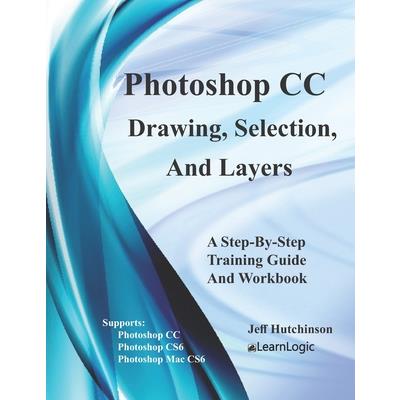
Photoshop CC - Drawing, Selection, And Layers
Photoshop CC - Drawing, Selection, And Layers


-
9折 385元
428元
-
 預計最高可得金幣15點
?
可100%折抵
預計最高可得金幣15點
?
可100%折抵
活動加倍另計 -
HAPPY GO享100累1點 4點抵1元 折抵無上限
-
分類:英文書>自然科普>電腦資訊>軟體追蹤? 追蹤分類後,您會在第一時間收到分類新品通知。
- 作者: Jeff,Hutchinson 追蹤 ? 追蹤作者後,您會在第一時間收到作者新書通知。
- 出版社: Createspace Independent Publishi 追蹤 ? 追蹤出版社後,您會在第一時間收到出版社新書通知。
- 出版日:2022/11/04

活動訊息
全館滿$1,200送150點金幣,4月歡慶兒童節,童書、玩具、文具滿1000元再送200點金幣!
內容簡介
This course will review image editing capabilities for modifying and touching up photos, and will help readers understand resolution and size for posting on the web or creating artwork. Selection of "raster images" is a big part of the course and will be explained in detail. Also, since the use of layers will help to isolate different elements of an image, the course will explain the effects of layers to blur a background which will highlight clearer images such as people, etc. This program is designed for aspiring graphic designers, photographers, or anyone who has a need to touch-up and fix photos. Note: The documentation supports both Adobe Suite CS6 (Version 11) and Adobe Suite CC (Version 12.) Obtain Your PDF Copy and Video Course
This workbook includes an Online Recorded Video course and PDF Download. Refer to the Workbook Introduction for instructions on where to send an Amazon receipt. Concepts CoveredPhotoshop Environment - Tools Panel, Options Bar, Zoom, Menu Bar, Adobe Bridge, Mini-Bridge, Panels, Hide Panel, Info Panel, Document Window, Status Bar, File Information Box, Workspace, Reset, New Workspace, Delete Workspace, Keyboards Changes, Menu Changes, Document Ruler, Ruler tool, Guides, Drag Guide, Clear Guides, Grid, Undo, Redo, History, and Revert Command.Basic Drawing Tools - Brush, Pencil, Paint Bucket, Move, Eraser, Eye Dropper, Type tool, and Hand tool.Resolution Type - Vector Graphics, Raster Graphics, Image Size, Pixel Dimension, Document Size, Image Resolution, RGB Color, CMYK Color, Lab Color, Grayscale, 8-bit vs 16-bit color, New Document, Save Presets, Background, Canvas, and Info Panel.Selection - Marquee tool Options, Rectangular Marquee, Elliptical Marquee, Single Row Marquee, Single Column Marquee, Lasso tool Options, Lasso tool, Polygonal Lasso, Magnetic Lasso, Quick Selection, Magic Wand, Save Selection, and Load Selection.Layers - Layers Panel, Background Layer, Create a Blank Layer, Move Layer to File, Create Layer from Selection, Layer Indicators, New Group, New Group from Layers, Arranging Layers, Type Layers, Transform Layers, Free Transform, Merge Layers, and Flatten Images.Filter Effects - Filters, Convert for Smart Filter, Filter Gallery, Adaptive Wide Angle, Lens Correction, Liquify, Oil Paint, Blur Filter, Distort, Noise, Pixelate, Render, Sharpen, Stylize, Video, Other, and Photo Filter.Layer Effects - Layer Styles, Blending Options, Bevel & Emboss, Stroke, Inter Shadow, Inter Glow, Satin, Color Overlay, Gradient Overlay, Pattern Overlay, Outer Glow, and Drop Shadow.Saving Techniques - Saving, File Formats, Photoshop, BMP, CompuServe GIF, Photoshop EPS, JPEG, Photoshop PDF, Photoshop RAW, PNG, TIFF, Saved Standards, and Save for Web.What's in the Workbook? Click on the left side of the screen: Look Inside!
Enter one of the following keywords: Photo, Selection, layers, resolution, filters, etc. How the Workbook is Designed
This Workbook contains over 70+ step-by-step practice exercises to help you get up to speed quickly and understand each concept. The following link is a Video Clip explaining how the Workbook has been designed and how to use it most effectively.
www.elearnlogic.com/media/workbook.mp4
This workbook includes an Online Recorded Video course and PDF Download. Refer to the Workbook Introduction for instructions on where to send an Amazon receipt. Concepts CoveredPhotoshop Environment - Tools Panel, Options Bar, Zoom, Menu Bar, Adobe Bridge, Mini-Bridge, Panels, Hide Panel, Info Panel, Document Window, Status Bar, File Information Box, Workspace, Reset, New Workspace, Delete Workspace, Keyboards Changes, Menu Changes, Document Ruler, Ruler tool, Guides, Drag Guide, Clear Guides, Grid, Undo, Redo, History, and Revert Command.Basic Drawing Tools - Brush, Pencil, Paint Bucket, Move, Eraser, Eye Dropper, Type tool, and Hand tool.Resolution Type - Vector Graphics, Raster Graphics, Image Size, Pixel Dimension, Document Size, Image Resolution, RGB Color, CMYK Color, Lab Color, Grayscale, 8-bit vs 16-bit color, New Document, Save Presets, Background, Canvas, and Info Panel.Selection - Marquee tool Options, Rectangular Marquee, Elliptical Marquee, Single Row Marquee, Single Column Marquee, Lasso tool Options, Lasso tool, Polygonal Lasso, Magnetic Lasso, Quick Selection, Magic Wand, Save Selection, and Load Selection.Layers - Layers Panel, Background Layer, Create a Blank Layer, Move Layer to File, Create Layer from Selection, Layer Indicators, New Group, New Group from Layers, Arranging Layers, Type Layers, Transform Layers, Free Transform, Merge Layers, and Flatten Images.Filter Effects - Filters, Convert for Smart Filter, Filter Gallery, Adaptive Wide Angle, Lens Correction, Liquify, Oil Paint, Blur Filter, Distort, Noise, Pixelate, Render, Sharpen, Stylize, Video, Other, and Photo Filter.Layer Effects - Layer Styles, Blending Options, Bevel & Emboss, Stroke, Inter Shadow, Inter Glow, Satin, Color Overlay, Gradient Overlay, Pattern Overlay, Outer Glow, and Drop Shadow.Saving Techniques - Saving, File Formats, Photoshop, BMP, CompuServe GIF, Photoshop EPS, JPEG, Photoshop PDF, Photoshop RAW, PNG, TIFF, Saved Standards, and Save for Web.What's in the Workbook? Click on the left side of the screen: Look Inside!
Enter one of the following keywords: Photo, Selection, layers, resolution, filters, etc. How the Workbook is Designed
This Workbook contains over 70+ step-by-step practice exercises to help you get up to speed quickly and understand each concept. The following link is a Video Clip explaining how the Workbook has been designed and how to use it most effectively.
www.elearnlogic.com/media/workbook.mp4
配送方式
-
台灣
- 國內宅配:本島、離島
-
到店取貨:
 不限金額免運費



-
海外
- 國際快遞:全球
-
港澳店取:


訂購/退換貨須知
加入金石堂 LINE 官方帳號『完成綁定』,隨時掌握出貨動態:


商品運送說明:
- 本公司所提供的產品配送區域範圍目前僅限台灣本島。注意!收件地址請勿為郵政信箱。
- 商品將由廠商透過貨運或是郵局寄送。消費者訂購之商品若無法送達,經電話或 E-mail無法聯繫逾三天者,本公司將取消該筆訂單,並且全額退款。
- 當廠商出貨後,您會收到E-mail出貨通知,您也可透過【訂單查詢】確認出貨情況。
- 產品顏色可能會因網頁呈現與拍攝關係產生色差,圖片僅供參考,商品依實際供貨樣式為準。
- 如果是大型商品(如:傢俱、床墊、家電、運動器材等)及需安裝商品,請依商品頁面說明為主。訂單完成收款確認後,出貨廠商將會和您聯繫確認相關配送等細節。
- 偏遠地區、樓層費及其它加價費用,皆由廠商於約定配送時一併告知,廠商將保留出貨與否的權利。
提醒您!!
金石堂及銀行均不會請您操作ATM! 如接獲電話要求您前往ATM提款機,請不要聽從指示,以免受騙上當!
退換貨須知:
**提醒您,鑑賞期不等於試用期,退回商品須為全新狀態**
-
依據「消費者保護法」第19條及行政院消費者保護處公告之「通訊交易解除權合理例外情事適用準則」,以下商品購買後,除商品本身有瑕疵外,將不提供7天的猶豫期:
- 易於腐敗、保存期限較短或解約時即將逾期。(如:生鮮食品)
- 依消費者要求所為之客製化給付。(客製化商品)
- 報紙、期刊或雜誌。(含MOOK、外文雜誌)
- 經消費者拆封之影音商品或電腦軟體。
- 非以有形媒介提供之數位內容或一經提供即為完成之線上服務,經消費者事先同意始提供。(如:電子書、電子雜誌、下載版軟體、虛擬商品…等)
- 已拆封之個人衛生用品。(如:內衣褲、刮鬍刀、除毛刀…等)
- 若非上列種類商品,均享有到貨7天的猶豫期(含例假日)。
- 辦理退換貨時,商品(組合商品恕無法接受單獨退貨)必須是您收到商品時的原始狀態(包含商品本體、配件、贈品、保證書、所有附隨資料文件及原廠內外包裝…等),請勿直接使用原廠包裝寄送,或於原廠包裝上黏貼紙張或書寫文字。
- 退回商品若無法回復原狀,將請您負擔回復原狀所需費用,嚴重時將影響您的退貨權益。


商品評價