




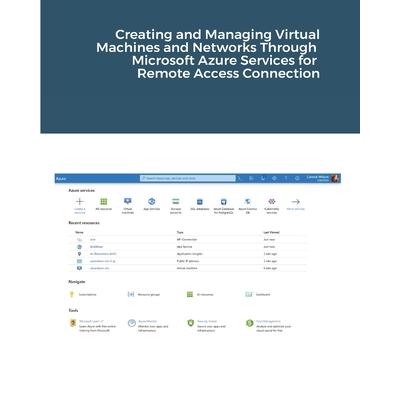
Creating and Managing Virtual Machines and Networks Through Microsoft Azure Services for Remote Access Connection
Creating and Managing Virtual Machines and Networks Through Microsoft




活動訊息
全館滿$1,200送150點金幣,4月歡慶兒童節,童書、玩具、文具滿1000元再送200點金幣!
內容簡介
The major benefit of a remote desktop connection is being able to connect to your data from anywhere in the world. Your data is in one place that is easy to see and you no longer have to have software installed on your own computer. Azure is one of the best virtual computers and networks providers for remote desktop (RDP) connections. Azure documentations is too deep and it is hard to be understand creating and managing virtual computers and networks in Auzre for remote access connection by any beginner. So, I tried to outline in this report the most important topics as reference guide to assist the user to create and manage virtual computers and networks in Azure for remote access connection in simplified and clear way. This report will include the following parts: 1. Getting free Azure subscription through Sandbox Microsoft Learn subscription (No credit card needed) 2. Free 12 months, then pay-as-you-go Azure account subscription (Credit card needed) 3. Student subscription (No debit/credit cards needed) 4. How to get university email 5. Virtual networks and virtual machines in Azure 6. Quick start for PowerShell in Azure Cloud Shell 7. Quick start with Azure PowerShell 8. Installing Azure CLI on Windows and creating virtual machine 9. Creating a Windows virtual machine in Azure 10. Quick start to create a Linux virtual machine in the Azure portal 11. Tutorial to create a NAT Gateway using the Azure portal and test the NAT service 12. What is Azure Network Watcher? 13. Network Watcher Agent 14. Troubleshoot connections with Azure Network Watcher using the Azure portal 15. Troubleshoot Azure VM connectivity problems 16. Quick start to configure Load Balancer 17. Quick start to configure VPN Gateway using Azure portal 18. Tutorial to connect to a virtual machine using Azure Bastion 19. Exercise to create Window Virtual Machine 20. Exercise to create Ubuntu Virtual Machine
配送方式
-
台灣
- 國內宅配:本島、離島
-
到店取貨:
 不限金額免運費



-
海外
- 國際快遞:全球
-
港澳店取:

訂購/退換貨須知
加入金石堂 LINE 官方帳號『完成綁定』,隨時掌握出貨動態:


商品運送說明:
- 本公司所提供的產品配送區域範圍目前僅限台灣本島。注意!收件地址請勿為郵政信箱。
- 商品將由廠商透過貨運或是郵局寄送。消費者訂購之商品若無法送達,經電話或 E-mail無法聯繫逾三天者,本公司將取消該筆訂單,並且全額退款。
- 當廠商出貨後,您會收到E-mail出貨通知,您也可透過【訂單查詢】確認出貨情況。
- 產品顏色可能會因網頁呈現與拍攝關係產生色差,圖片僅供參考,商品依實際供貨樣式為準。
- 如果是大型商品(如:傢俱、床墊、家電、運動器材等)及需安裝商品,請依商品頁面說明為主。訂單完成收款確認後,出貨廠商將會和您聯繫確認相關配送等細節。
- 偏遠地區、樓層費及其它加價費用,皆由廠商於約定配送時一併告知,廠商將保留出貨與否的權利。
提醒您!!
金石堂及銀行均不會請您操作ATM! 如接獲電話要求您前往ATM提款機,請不要聽從指示,以免受騙上當!
退換貨須知:
**提醒您,鑑賞期不等於試用期,退回商品須為全新狀態**
-
依據「消費者保護法」第19條及行政院消費者保護處公告之「通訊交易解除權合理例外情事適用準則」,以下商品購買後,除商品本身有瑕疵外,將不提供7天的猶豫期:
- 易於腐敗、保存期限較短或解約時即將逾期。(如:生鮮食品)
- 依消費者要求所為之客製化給付。(客製化商品)
- 報紙、期刊或雜誌。(含MOOK、外文雜誌)
- 經消費者拆封之影音商品或電腦軟體。
- 非以有形媒介提供之數位內容或一經提供即為完成之線上服務,經消費者事先同意始提供。(如:電子書、電子雜誌、下載版軟體、虛擬商品…等)
- 已拆封之個人衛生用品。(如:內衣褲、刮鬍刀、除毛刀…等)
- 若非上列種類商品,均享有到貨7天的猶豫期(含例假日)。
- 辦理退換貨時,商品(組合商品恕無法接受單獨退貨)必須是您收到商品時的原始狀態(包含商品本體、配件、贈品、保證書、所有附隨資料文件及原廠內外包裝…等),請勿直接使用原廠包裝寄送,或於原廠包裝上黏貼紙張或書寫文字。
- 退回商品若無法回復原狀,將請您負擔回復原狀所需費用,嚴重時將影響您的退貨權益。



商品評價