




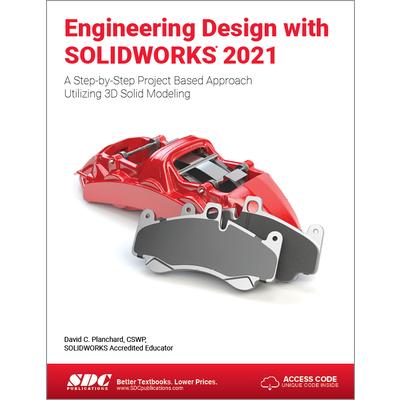
Engineering Design with Solidworks 2021


-
 預計最高可得金幣235點
?
可100%折抵
預計最高可得金幣235點
?
可100%折抵
活動加倍另計 -
HAPPY GO享100累1點 4點抵1元 折抵無上限
-
分類:英文書>自然科普>電腦資訊>軟體追蹤? 追蹤分類後,您會在第一時間收到分類新品通知。
- 作者: David C,Planchard 追蹤 ? 追蹤作者後,您會在第一時間收到作者新書通知。
- 出版社: SDC Publications (Schroff Develo 追蹤 ? 追蹤出版社後,您會在第一時間收到出版社新書通知。
- 出版日:2021/09/02

內容簡介
Engineering Design with SOLIDWORKS 2021 is written to assist students, designers, engineers and professionals. The book provides a solid foundation in SOLIDWORKS by utilizing projects with step-by-step instructions for the beginner to intermediate SOLIDWORKS user featuring machined, plastic and sheet metal components.
Desired outcomes and usage competencies are listed for each project. The book is divided into five sections with 11 projects.
Project 1 - Project 6: Explore the SOLIDWORKS User Interface and CommandManager, Document and System properties, simple and complex parts and assemblies, proper design intent, design tables, configurations, multi-sheet, multi-view drawings, BOMs, and Revision tables using basic and advanced features. Additional techniques include the edit and reuse of features, parts, and assemblies through symmetry, patterns, configurations, SOLIDWORKS 3D ContentCentral and the SOLIDWORKS Toolbox.
Project 7: Understand Top-Down assembly modeling and Sheet Metal parts. Develop components In-Context with InPlace Mates, along with the ability to import parts using the Top-Down assembly method. Convert a solid part into a Sheet Metal part and insert and apply various Sheet Metal features.
Project 8 - Project 9: Recognize SOLIDWORKS Simulation and Intelligent Modeling techniques. Understand a general overview of SOLIDWORKS Simulation and the type of questions that are on the SOLIDWORKS Simulation Associate - Finite Element Analysis (CSWSA-FEA) exam. Apply design intent and intelligent modeling techniques in a sketch, feature, part, plane, assembly and drawing.
Project 10: Comprehend the differences between additive and subtractive manufacturing. Understand 3D printer terminology along with a working knowledge of preparing, saving, and printing CAD models on a low cost printer.
Project 11: Review the Certified SOLIDWORKS Associate (CSWA) program. Understand the curriculum and categories of the CSWA exam and the required model knowledge needed to successfully take the exam.
The author developed the industry scenarios by combining his own industry experience with the knowledge of engineers, department managers, vendors and manufacturers. These professionals are directly involved with SOLIDWORKS every day. Their responsibilities go far beyond the creation of just a 3D model.
配送方式
-
台灣
- 國內宅配:本島、離島
-
到店取貨:
-
海外
- 國際快遞:全球
訂購/退換貨須知
加入金石堂 LINE 官方帳號『完成綁定』,隨時掌握出貨動態:


商品運送說明:
- 本公司所提供的產品配送區域範圍目前僅限台灣本島。注意!收件地址請勿為郵政信箱。
- 商品將由廠商透過貨運或是郵局寄送。消費者訂購之商品若無法送達,經電話或 E-mail無法聯繫逾三天者,本公司將取消該筆訂單,並且全額退款。
- 當廠商出貨後,您會收到E-mail出貨通知,您也可透過【訂單查詢】確認出貨情況。
- 產品顏色可能會因網頁呈現與拍攝關係產生色差,圖片僅供參考,商品依實際供貨樣式為準。
- 如果是大型商品(如:傢俱、床墊、家電、運動器材等)及需安裝商品,請依商品頁面說明為主。訂單完成收款確認後,出貨廠商將會和您聯繫確認相關配送等細節。
- 偏遠地區、樓層費及其它加價費用,皆由廠商於約定配送時一併告知,廠商將保留出貨與否的權利。
提醒您!!
金石堂及銀行均不會請您操作ATM! 如接獲電話要求您前往ATM提款機,請不要聽從指示,以免受騙上當!
退換貨須知:
**提醒您,鑑賞期不等於試用期,退回商品須為全新狀態**
-
依據「消費者保護法」第19條及行政院消費者保護處公告之「通訊交易解除權合理例外情事適用準則」,以下商品購買後,除商品本身有瑕疵外,將不提供7天的猶豫期:
- 易於腐敗、保存期限較短或解約時即將逾期。(如:生鮮食品)
- 依消費者要求所為之客製化給付。(客製化商品)
- 報紙、期刊或雜誌。(含MOOK、外文雜誌)
- 經消費者拆封之影音商品或電腦軟體。
- 非以有形媒介提供之數位內容或一經提供即為完成之線上服務,經消費者事先同意始提供。(如:電子書、電子雜誌、下載版軟體、虛擬商品…等)
- 已拆封之個人衛生用品。(如:內衣褲、刮鬍刀、除毛刀…等)
- 若非上列種類商品,均享有到貨7天的猶豫期(含例假日)。
- 辦理退換貨時,商品(組合商品恕無法接受單獨退貨)必須是您收到商品時的原始狀態(包含商品本體、配件、贈品、保證書、所有附隨資料文件及原廠內外包裝…等),請勿直接使用原廠包裝寄送,或於原廠包裝上黏貼紙張或書寫文字。
- 退回商品若無法回復原狀,將請您負擔回復原狀所需費用,嚴重時將影響您的退貨權益。




商品評價